
<div class="psvr-landing">
    <div class="left-img">
        <img src="https://virtualrealporn.com/wp-content/plugins/virtualreal/app/public/assets/img/landings/psvr-porn/vrp/psvr-liya-silver-pornstar.webp" alt="actriz porno en psvr liya silver">
    </div>
    <div class="right-img">
        <img src="https://virtualrealporn.com/wp-content/plugins/virtualreal/app/public/assets/img/landings/psvr-porn/vrp/psvr-elsa-jean-pornstar.webp" alt="actriz porno en psvr elsa jean">
    </div>
    <section id="herobaner" class="inner-section">
        <div class="container">
            <div class="herobaner-content-psvr">
                <h1>PORNO PSVR & PSVR2</h1>
                <h2>Estás en la <span>mejor web de Porno para PSVR y PSVR2</span></h2>
                <p>Si quieres disfrutar de <strong>el mejor porno VR en tu Playstation</strong>, estás a solo unos pasos.</p>
                <p>En menos de 5 minutos aprenderás <strong>cómo ver Porno en VR con PSVR & PSVR2</strong> y además podrás disfrutarlo en tu videoconsola.</p>
                <p class="title-p">¿Qué tipo de experiencia estás buscando?</p>
                <nav class="pages-dis list-page-dis">
                    <span class="current-option">
                        <h3>Porno</h3>
                    </span>
                    <a class="go-trans" href="https://virtualrealtrans.com/playstation-vr/">
                        <h3>Porno Trans</h3>
                    </a>
                    <a class="go-gay" href="https://virtualrealgay.com/playstation-vr/">
                        <h3>Porno Gay</h3>
                    </a>
                    <a class="go-passion" href="https://virtualrealpassion.com/playstation-vr/">
                        <h3>POV Femenino</h3>
                    </a>
                </nav>
                <div class="psvr-logos">
                    <div class="logo_psvr">
                        <img src="https://virtualrealporn.com/wp-content/plugins/virtualreal/app/public/assets/img/landings/psvr-porn//psvr-logo.webp" width="154px" height="32px" alt="Logo de PlayStation VR" />
                    </div>
                    <span>&</span>
                    <div class="logo_psvr">
                        <span class="new_label">nuevo casco</span>
                        <img src="https://virtualrealporn.com/wp-content/plugins/virtualreal/app/public/assets/img/landings/psvr-porn//psvr2-logo.webp" width="165px" height="32px" alt="Logo de PlayStation VR2" />
                    </div>
                </div>
            </div>
        </div>
    </section>
            <section id="" class="video_join">
            <div class="container">
                <div class="vrp featured_video_free_container">
                    <div class="video-free-portada">
                        <div class="video-free-caption">
                            <div class="logo_n_name">
                                <img src="https://virtualrealporn.com/wp-content/plugins/virtualreal/app/public/assets/img/landings/psvr-porn/w_logo.svg" alt="Las mejores webs de porno en VR para PS4" width="85" height="">
                                <div class="video_act">
                                    <div>APARECE</div><div class="act_name">LIYA SILVER</div>                                </div>
                            </div>
                            <p>Ya puedes disfrutar del mejor video de Liya Silver en tu <strong>Playstation</strong>. No lo pienses más, si tienes tus gafas de realidad virtual tienes que probarlo...</p>
                        </div>
                        <a href="https://virtualrealporn.com/es/vr-porn-video/lovely-thanksgiving-day/"></a>
                    </div>
                                <div class="buy_box_w ">
                <div class="join_now_box">
            <div class="header_buy_box">
                <p class="title">EXPERIENCIA PSVR COMPLETA</p>
                <p class="subtitle">Querría el pack completo</p>
            </div>
            <div class="body_buy_box">
                <div class="offers_div">
                    <div class="offer">
                                                <div class="discount">3 MONTHS FREE</div>
                        <div class="price">[price|t=M|app=/month|def=$9.95]</div>
                        <div class="nota">Cancela en cualquier momento</div>
                    </div>
                    <a href="https://virtualrealporn.com/goto/join/?rid=vrc%2Cproinmk%2Cchlk%2Cptnjoin-more-subs&lang=es"
                        class="cta-secondary-link">See more subscriptions</a>
                </div>
                <ul class="features-list">
                                            <li class="feature-p"><img src="https://virtualrealporn.com/wp-content/plugins/virtualreal/app/public/assets/img/landings/8K/arrow-turn-up-solid.svg" alt="" width="13"
                                height="">+1,190 vídeos inmersivos</li>
                                            <li class="feature-p"><img src="https://virtualrealporn.com/wp-content/plugins/virtualreal/app/public/assets/img/landings/8K/arrow-turn-up-solid.svg" alt="" width="13"
                                height="">2 New videos per semana</li>
                                            <li class="feature-p"><img src="https://virtualrealporn.com/wp-content/plugins/virtualreal/app/public/assets/img/landings/8K/arrow-turn-up-solid.svg" alt="" width="13"
                                height="">Compatible con PS4, PS4 Pro o PS5</li>
                                    </ul>
                <a href="https://virtualrealporn.com/goto/join/?rid=vrc%2Cproinmk%2Cchlk%2Cptnjoin-primary-cta&lang=es" class="btn btn-default cta-link">ÚNETE AHORA</a>
            </div>
        </div>
                </div>
                    </div>
            </div>
        </section>
       
    <section id="how-to-watch" class="inner-section">
        <div class="container">
            <h2><span>Cómo ver</span> porno VR en PSVR</h2>
            <p>Si ya tienes una cuenta en Virtual Real Porn y <strong>quieres usar tu PSVR para ver porno</strong>, es muy simple. Actualmente tienes dos <strong>Apps de Porno PSVR</strong> para ver porno en tu PlayStation. <strong>(Compatible con PS4, PS4 Pro y PS5)</strong></p>
            <div class="options_group">
                <div class="option">
                    <div class="header_option">
                        <div class="name_option">
                            <img src="https://virtualrealporn.com/wp-content/plugins/virtualreal/app/public/assets/img/landings/psvr-porn//watchvr.webp" width="100px" height="100px" alt="watchvr, app gratuita de porno para psvr">
                            <div class="name_option_text">
                                <h3>WatchVR</h3>
                                <p>Porno para PSVR sin Littlestar</p>
                            </div>
                        </div>
                        <a href="https://store.playstation.com/en-us/product/UP5654-CUSA23499_00-4018718446832574" rel="nofollow" target="_blank" class="download_link">
                            <img src="https://virtualrealporn.com/wp-content/plugins/virtualreal/app/public/assets/img/landings/psvr-porn//psvr-store-logo.webp" width="52px" height="66px" alt="playstation vr store">
                            <span>playstation vr store</span>
                        </a>
                    </div>
                    <div class="content_option">
                        <div class="content_features">
                            <div class="feature dest">
                                <i class="fa fa-heart"></i> Totalmente GRATIS                            </div>
                            <div class="feature">
                                <i class="fa fa-usb"></i> No es necesario tener USB                            </div>
                            <div class="feature">
                                <i class="fa fa-youtube"></i> Solo Streaming                            </div>
                        </div>
                        <ul class="option_steps">
                            <li><span class="step_number">1</span> <span>Ve a <strong>"Mi Cuenta"</strong> y haz click en la pestaña <strong>"App Streaming PSVR"</strong>.</span></li>
                            <li><span class="step_number">2</span> <span>Escribe o recuerda la URL. <strong>Ej: (https://vrhub.cc/XXXXXXXX)</strong></span></li>
                            <li><span class="step_number">3</span> <span>Instala la <strong>app GRATUITA WatchVR</strong> en tu PSVR</span></li>
                            <li><span class="step_number">4</span> <span>Haz click en el botón <strong>"Añadir"</strong>. Escribe la URL y después haz click en <strong>"OK"</strong>.</span></li>
                        </ul>
                        <p class="title-p">Una vez abras éste canal verás todos nuestros vídeos y podrás verlos.</p>
                    </div>
                </div>
                <div class="option">
                    <div class="header_option">
                        <div class="name_option">
                            <img src="https://virtualrealporn.com/wp-content/plugins/virtualreal/app/public/assets/img/landings/psvr-porn//littlstar.webp" width="100px" height="100px" alt="App Porno para PSVR Littlstar">
                            <div class="name_option_text">
                                <h3>LITTLSTAR “RAD”</h3>
                            </div>
                        </div>
                        <a href="https://rad.live/" rel="nofollow" target="_blank" class="download_link">
                            <img src="https://virtualrealporn.com/wp-content/plugins/virtualreal/app/public/assets/img/landings/psvr-porn//psvr-store-logo.webp" width="52px" height="66px" alt="playstation vr store">
                            <span>playstation vr store</span>
                        </a>
                    </div>
                    <div class="content_option">
                        <div class="content_features">
                            <div class="feature">
                                <i class="fa fa-certificate" aria-hidden="true"></i> Cuenta Premium                            </div>
                            <div class="feature">
                                <i class="fa fa-arrow-circle-o-down" aria-hidden="true"></i> Contenido descargado                            </div>
                        </div>
                        <ul class="option_steps">
                            <li><span class="step_number">1</span> <span><strong>Descarga</strong> nuestros vídeos desde PC o Mac</span></li>
                            <li><span class="step_number">2</span> <span>Cópielos a un <strong>dispositivo USB</strong> en una carpeta llamada Littlstar</span></li>
                            <li><span class="step_number">3</span> <span><strong>Conéctese</strong> a su sistema Playstation.</span></li>
                            <li><span class="step_number">4</span> <span><strong>Abrir Littlestar RAD</strong>. Ir a la biblioteca.</span></li>
                        </ul>
                        <p class="title-p">¡Disfruta!</p>
                    </div>
                </div>
            </div>
        </div>
    </section>
            <section id="" class="inner-section join-section">
            <div class="container">
                <h2>Tan <span>inmersivo</span> como esperas</h2>
                <p>Nuevas formas de explorar tus deseos. Nuevas posibilidades para disfrutar de tu <strong>Porno para PSVR</strong></p>
                <a href="https://virtualrealporn.com/goto/join/?rid=vrc%2Cproinmk%2Cchlk%2Cptnjoin-secondary-cta&lang=es" class="btn btn-default">ÚNETE AHORA</a>
            </div>
        </section>
        <section id="psvr2-porn" class="">
        <div class="container">
            <div class="img_psvr2">
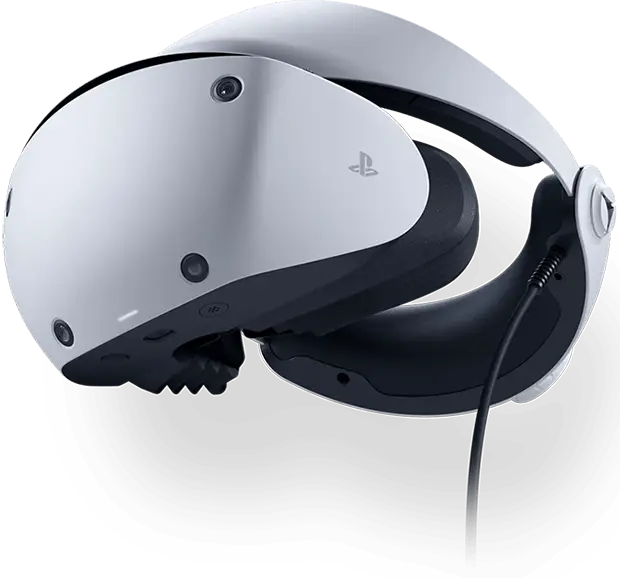
                <img src="https://virtualrealporn.com/wp-content/plugins/virtualreal/app/public/assets/img/landings/psvr-porn//psvr2-headset.webp" width="620" height="578" alt="Casco PlayStation VR2">
            </div>
            <div class="data-psvr2">
                <h2>PSVR2</h2>
                <h3>El nuevo Casco de Realidad Virtual para Playstation ya está en el mercado</h3>
                <ul class="features">
                    <li>
                        <span class="upgrade-box"><img src="https://virtualrealporn.com/wp-content/plugins/virtualreal/app/public/assets/img/landings/psvr-porn/upgrade-icon.svg" alt="" width="24" height="24"></span>
                        4 veces la resolución del PlayStation®VR original.                    </li>
                    <li>
                        <span class="upgrade-box"><img src="https://virtualrealporn.com/wp-content/plugins/virtualreal/app/public/assets/img/landings/psvr-porn/upgrade-icon.svg" alt="" width="24" height="24"></span>
                        Enfoque increíblemente nítido                    </li>
                    <li>
                        <span class="upgrade-box"><img src="https://virtualrealporn.com/wp-content/plugins/virtualreal/app/public/assets/img/landings/psvr-porn/upgrade-icon.svg" alt="" width="24" height="24"></span>
                        Sienta una increíble sensación de presencia con un campo de visión de 110 grados                    </li>
                </ul>
                <div class="alert-box">
                    <div class="top-alert">
                        <img src="https://virtualrealporn.com/wp-content/plugins/virtualreal/app/public/assets/img/landings/psvr-porn/alert-icon.svg" alt="" width="42" height="42">
                        <div>
                            <h3>¿Puedes ver Porno VR en PSVR2?</h3>
                            <p>Actualmente, las apps que recomendamos para ver nuestros vídeos en PSVR <strong style='text-decoration:underline'>NO FUNCIONAN EN PSVR2</strong>. Esperamos poder informarte más pronto que tarde de que las apps que recomendamos para tu PSVR2 están disponibles.</p>
                        </div>
                    </div>
                    <div class="form-box">
                        <h4>¿Quieres ser el primero en enterarte?</h4>
                        <p>Danos tu correo electrónico y te avisaremos cuando estemos seguros de que puedes reproducir nuestros vídeos en PSVR2.</p>
                        <form id="psvr2-newsletter-form" action="#">
                            <div class="form-group">
                                <input type="email" name="email" class="form-control" id="" aria-describedby="Let us your email for notify you" placeholder="" />
                                <button type="submit" class="">ENVIAR</button>
                            </div>
                            <div class="acceptance-checks">
                                <div class="input-block">
                                    <input type="checkbox" name="privacy_policy" class="privacy-policy-check">
                                    <span>He leído y acepto la <a href="https://virtualrealporn.com/es/privacy-policy/"> Política de Privacidad </a> y los <a href="https://virtualrealporn.com/es/contracting-conditions/"> Términos de Uso </a></span>
                                </div>
                            </div>
                            <div class="form-message" data-type=""></div>
                        </form>
                    </div>
                </div>
            </div>
        </div>
    </section>
    <section class="links-section">
        <div class="container">
            <div class="row">
                <div class="col-md-6">
                    <h2>¿Qué Calidad puedo reproducir en mi PlayStation?</h2>
                    <p>Your Playstation can play VR porn videos (even <a href='https://virtualrealporn.com/es/free-vr-porn/psvr/'>Free VR Porn PS4</a>) up to 4K resolution but... Don&#39;t worry! All of our 8K videos are available and fully optimized for playback at lower qualities.</p>
                </div>
                <div class="col-md-6">
                    <div class="links-box-list">
                        <div class="inter-box">
                            <span>Resolución más Popular</span>
                            <h3>Vídeos Porno VR <span>4K</span></h3>
                            <ul>
                                <li>Disponible para todas las gafas</li>
                                <li>Descarga & haz streaming de vídeos completos</li>
                                <li>Vídeos Porno en VR en Ultra HD</li>
                            </ul>
                            <a href="https://virtualrealporn.com/es/4k-vr-porn/" class="btn btn-default">
                                PORNO EN VR 4K                            </a>
                        </div>
                        <div class="inter-box">
                            <span>The Apple Vision PRO experience</span>
                            <div class="h3 no-margin">
                                <img src="/wp-content/plugins/virtualreal/app/public/assets/img/home/headsets/apple_vision_pro_logo.webp" alt="" width="150px" height="" />
                            </div>
                            <p class="big_text">Join the revolution of Spatial Computing Porn</p>
                            <p>Tailored for you</p>
                            <a href="https://virtualrealporn.com/es/apple-vision-pro-porn/" class="btn btn-default">
                                <h3>APPLE VISION PRO</h3>
                            </a>
                        </div>
                    </div>
                </div>
            </div>
        </div>
    </section>
    <section class="faqs">
        <div class="container">
            <div class="tittle_comp w_line">
                <h2 class="tittle_module">FAQ WatchVR Player for Playstation</h2>
                <p>Dive into our Frequently Asked Questions section, where we reveal insights and resolve queries about your experience with WatchVR Player for Playstation. Whether it&#39;s technical guidance or content inquiries, we provide transparent information to enhance your journey with us.</p>
            </div>
            <div class="accordion" id="">
                <div class="accordion-item">
                    <div class="accordion-header" id="">
                        <span class="tittle_header">What is PlayStation VR (PSVR)?</span>
                        <span class="tittle_icon"><i class="fa fa-caret-right"></i></span>
                    </div>
                    <div id="" class="accordion-collapse">
                        <div class="accordion-body">
                            <p>PSVR is a virtual reality headset developed by Sony Interactive Entertainment for use with the PlayStation 4 (PS4) and PlayStation 5 (PS5) gaming consoles. It provides an immersive gaming experience with high-resolution displays and precise tracking technology.</p>
                        </div>
                    </div>
                </div>
                <div class="accordion-item">
                    <div class="accordion-header" id="">
                        <span class="tittle_header">Can I watch porn on PSVR?</span>
                        <span class="tittle_icon"><i class="fa fa-caret-right"></i></span>
                    </div>
                    <div id="" class="accordion-collapse">
                        <div class="accordion-body">
                            <p>Yes, you can watch adult content on PSVR using compatible VR video players and apps available on the PlayStation Store or by accessing web-based VR content through the PlayStation 4 or PlayStation 5&#39;s web browser.</p>
                        </div>
                    </div>
                </div>
                <div class="accordion-item">
                    <div class="accordion-header" id="">
                        <span class="tittle_header">How to set up PSVR?</span>
                        <span class="tittle_icon"><i class="fa fa-caret-right"></i></span>
                    </div>
                    <div id="" class="accordion-collapse">
                        <div class="accordion-body">
                            <p>Setting up the PSVR involves several steps:
1. Connect the Processor Unit to your PS4 or PS5 console.
2. Connect the PSVR headset to the Processor Unit using the included cables.
3. Connect the PlayStation Camera to your console and position it for optimal tracking.
4. Follow the on-screen instructions to complete the setup and calibration process.</p>
                        </div>
                    </div>
                </div>
                <div class="accordion-item">
                    <div class="accordion-header" id="">
                        <span class="tittle_header">How to install PSVR?</span>
                        <span class="tittle_icon"><i class="fa fa-caret-right"></i></span>
                    </div>
                    <div id="" class="accordion-collapse">
                        <div class="accordion-body">
                            <p>To install PlayStation VR, connect the headset and Processor Unit to your PS4 or PS5 using the provided cables. Ensure the PlayStation Camera is connected and positioned correctly. Follow the on-screen instructions to complete the installation and calibration process.</p>
                        </div>
                    </div>
                </div>
                <div class="accordion-item">
                    <div class="accordion-header" id="">
                        <span class="tittle_header">How turn on PSVR?</span>
                        <span class="tittle_icon"><i class="fa fa-caret-right"></i></span>
                    </div>
                    <div id="" class="accordion-collapse">
                        <div class="accordion-body">
                            <p>To turn on PlayStation VR, ensure the headset is connected to your PS4 or PS5 and the Processor Unit is powered on. Turn on your console, and then press the power button on the inline remote of the PSVR headset. Follow the on-screen instructions to adjust the fit and calibrate the headset.</p>
                        </div>
                    </div>
                </div>
                <div class="accordion-item">
                    <div class="accordion-header" id="">
                        <span class="tittle_header">What VR video players are recommended for watching adult content on PSVR?</span>
                        <span class="tittle_icon"><i class="fa fa-caret-right"></i></span>
                    </div>
                    <div id="" class="accordion-collapse">
                        <div class="accordion-body">
                            <p>Recommended VR video players for watching adult content on PlayStation VR include Littlstar VR Cinema and YouTube VR. These applications support various video formats and provide customizable settings for an optimal viewing experience.</p>
                        </div>
                    </div>
                </div>
                <div class="accordion-item">
                    <div class="accordion-header" id="">
                        <span class="tittle_header">How do I install apps on PSVR for viewing adult content?</span>
                        <span class="tittle_icon"><i class="fa fa-caret-right"></i></span>
                    </div>
                    <div id="" class="accordion-collapse">
                        <div class="accordion-body">
                            <p>To install apps on PlayStation VR for viewing adult content, visit the PlayStation Store on your PS4 or PS5. Search for VR video players like Littlstar VR Cinema or YouTube VR, and follow the prompts to download and install them. Once installed, launch the app and access adult content stored locally or streamed online.</p>
                        </div>
                    </div>
                </div>           
            
                <div class="accordion-item">
                    <div class="accordion-header" id="">
                        <span class="tittle_header">Is it safe to watch adult content on PSVR?</span>
                        <span class="tittle_icon"><i class="fa fa-caret-right"></i></span>
                    </div>
                    <div id="" class="accordion-collapse">
                        <div class="accordion-body">
                            <p>Yes, it is safe to watch adult content on PlayStation VR if you use reputable apps and sources. Ensure your console and VR software are up to date to minimize security risks. Avoid downloading content from unknown sources and follow best practices for online safety.</p>
                        </div>
                    </div>
                </div>
            
                <div class="accordion-item">
                    <div class="accordion-header" id="">
                        <span class="tittle_header">Can you use PSVR on PC?</span>
                        <span class="tittle_icon"><i class="fa fa-caret-right"></i></span>
                    </div>
                    <div id="" class="accordion-collapse">
                        <div class="accordion-body">
                            <p>No, PlayStation VR does not need a PC. It is designed to work with PlayStation 4 and PlayStation 5 gaming consoles. All VR content and applications are accessed and run through the console.</p>
                        </div>
                    </div>
                </div>
            
                <div class="accordion-item">
                    <div class="accordion-header" id="">
                        <span class="tittle_header">Does PSVR work on PS4?</span>
                        <span class="tittle_icon"><i class="fa fa-caret-right"></i></span>
                    </div>
                    <div id="" class="accordion-collapse">
                        <div class="accordion-body">
                            <p>Yes, PlayStation VR is designed to work with the PlayStation 4 (PS4) gaming console.</p>
                        </div>
                    </div>
                </div>
            
                <div class="accordion-item">
                    <div class="accordion-header" id="">
                        <span class="tittle_header">Does PSVR work on PS5?</span>
                        <span class="tittle_icon"><i class="fa fa-caret-right"></i></span>
                    </div>
                    <div id="" class="accordion-collapse">
                        <div class="accordion-body">
                            <p>Yes, PlayStation VR (PSVR) is compatible with the PlayStation 5 (PS5). Sony has provided an adapter for the PlayStation Camera to ensure PSVR functionality with the PS5.</p>
                        </div>
                    </div>
                </div>
                <div class="accordion-item">
                    <div class="accordion-header" id="">
                        <span class="tittle_header">How to connect PSVR to PS5?</span>
                        <span class="tittle_icon"><i class="fa fa-caret-right"></i></span>
                    </div>
                    <div id="" class="accordion-collapse">
                        <div class="accordion-body">
                            <p>To connect your PlayStation VR (PSVR) headset to your PlayStation 5 (PS5):
1.  first ensure your PS5 console is set up and connected to your TV.
2. Connect the PlayStation Camera to a USB port on the PS5.
3.  Obtain the PSVR to PS5 adapter from Sony if you haven&#39;t already, and connect it to another USB port on the PS5.
4. Plug the PSVR headset into the PS5 using its HDMI and USB cables.
5. Turn on the PS5 and follow on-screen instructions to set up the PSVR headset and camera.
6. Adjust the PlayStation Camera for optimal tracking.
7. Once set up, you can enjoy playing PSVR-compatible games on your PS5, leveraging its enhanced performance for an immersive gaming experience.</p>
                        </div>
                    </div>
                </div>
                <div class="accordion-item">
                    <div class="accordion-header" id="">
                        <span class="tittle_header">Is PSVR wireless?</span>
                        <span class="tittle_icon"><i class="fa fa-caret-right"></i></span>
                    </div>
                    <div id="" class="accordion-collapse">
                        <div class="accordion-body">
                            <p>No, PlayStation VR is not wireless. It requires a wired connection to the PlayStation console via the Processor Unit for both power and data transmission.</p>
                        </div>
                    </div>
                </div>
                <div class="accordion-item">
                    <div class="accordion-header" id="">
                        <span class="tittle_header">How can I access 360&deg; adult videos on PSVR?</span>
                        <span class="tittle_icon"><i class="fa fa-caret-right"></i></span>
                    </div>
                    <div id="" class="accordion-collapse">
                        <div class="accordion-body">
                            <p>To access 360&deg; adult videos on PlayStation VR, download the videos to a USB drive or stream them through a compatible VR video player app like Littlstar VR Cinema or YouTube VR. Connect the USB drive to your console, launch the VR video player, and navigate to the 360&deg; video file for an immersive viewing experience.</p>
                        </div>
                    </div>
                </div>
                <div class="accordion-item">
                    <div class="accordion-header" id="">
                        <span class="tittle_header">What formats are supported by PSVR for adult videos?</span>
                        <span class="tittle_icon"><i class="fa fa-caret-right"></i></span>
                    </div>
                    <div id="" class="accordion-collapse">
                        <div class="accordion-body">
                            <p>PlayStation VR supports various video formats, including MP4, MKV, and AVI, depending on the VR video player used. Ensure the video player app you choose is compatible with PlayStation VR and supports the format of your adult content for seamless playback.</p>
                        </div>
                    </div>
                </div>
            
                <div class="accordion-item">
                    <div class="accordion-header" id="">
                        <span class="tittle_header">What formats are supported by PSVR for adult videos?</span>
                        <span class="tittle_icon"><i class="fa fa-caret-right"></i></span>
                    </div>
                    <div id="" class="accordion-collapse">
                        <div class="accordion-body">
                            <p>PlayStation VR supports various video formats, including MP4, MKV, and AVI, depending on the VR video player used. Ensure the video player app you choose is compatible with PlayStation VR and supports the format of your adult content for seamless playback.</p>
                        </div>
                    </div>
                </div>
            
                <div class="accordion-item">
                    <div class="accordion-header" id="">
                        <span class="tittle_header">How to reset PSVR?</span>
                        <span class="tittle_icon"><i class="fa fa-caret-right"></i></span>
                    </div>
                    <div id="" class="accordion-collapse">
                        <div class="accordion-body">
                            <p>To reset PlayStation VR, disconnect the headset and Processor Unit from your console. Reconnect all cables and ensure they are securely plugged in. Restart your console and follow the on-screen instructions to recalibrate the headset and camera.</p>
                        </div>
                    </div>
                </div>
            
                <div class="accordion-item">
                    <div class="accordion-header" id="">
                        <span class="tittle_header">How to clean PSVR lens?</span>
                        <span class="tittle_icon"><i class="fa fa-caret-right"></i></span>
                    </div>
                    <div id="" class="accordion-collapse">
                        <div class="accordion-body">
                            <p>To clean the lenses of PlayStation VR, use a clean, dry microfiber cloth to gently wipe the lenses in a circular motion from the center outward. Avoid using liquids or abrasive materials that could damage the lenses. If needed, lightly breathe on the lenses to create moisture before wiping them with the cloth.</p>
                        </div>
                    </div>
                </div>
           
                <div class="accordion-item">
                    <div class="accordion-header" id="">
                        <span class="tittle_header">Does PSVR work with Steam?</span>
                        <span class="tittle_icon"><i class="fa fa-caret-right"></i></span>
                    </div>
                    <div id="" class="accordion-collapse">
                        <div class="accordion-body">
                            <p>No, PlayStation VR is not natively compatible with Steam. PlayStation VR is designed to work with PlayStation consoles and does not have official support for PC or SteamVR. However, some third-party solutions may enable limited compatibility, but they are not officially supported and may require additional setup.</p>
                        </div>
                    </div>
                </div>
            </div>
        </div>
    </section>
</div>

<script type="application/ld+json">
{
  "@context": "https://schema.org",
  "@type": "FAQPage",
  "mainEntity": [
    {
      "@type": "Question",
      "name": "What is PlayStation VR (PSVR)?",
      "acceptedAnswer": {
        "@type": "Answer",
        "text": "PSVR is a virtual reality headset developed by Sony Interactive Entertainment for use with the PlayStation 4 (PS4) and PlayStation 5 (PS5) gaming consoles. It provides an immersive gaming experience with high-resolution displays and precise tracking technology."
      }
    },
    {
      "@type": "Question",
      "name": "Can I watch porn on PSVR?",
      "acceptedAnswer": {
        "@type": "Answer",
        "text": "Yes, you can watch adult content on PSVR using compatible VR video players and apps available on the PlayStation Store or by accessing web-based VR content through the PlayStation 4 or PlayStation 5's web browser."
      }
    },
    {
      "@type": "Question",
      "name": "How to set up PSVR?",
      "acceptedAnswer": {
        "@type": "Answer",
        "text": "Setting up the PSVR involves several steps:\n1. Connect the Processor Unit to your PS4 or PS5 console.\n2. Connect the PSVR headset to the Processor Unit using the included cables.\n3. Connect the PlayStation Camera to your console and position it for optimal tracking.\n4. Follow the on-screen instructions to complete the setup and calibration process."
      }
    },
    {
      "@type": "Question",
      "name": "How to install PSVR?",
      "acceptedAnswer": {
        "@type": "Answer",
        "text": "To install PlayStation VR, connect the headset and Processor Unit to your PS4 or PS5 using the provided cables. Ensure the PlayStation Camera is connected and positioned correctly. Follow the on-screen instructions to complete the installation and calibration process."
      }
    },
    {
      "@type": "Question",
      "name": "How turn on PSVR?",
      "acceptedAnswer": {
        "@type": "Answer",
        "text": "To turn on PlayStation VR, ensure the headset is connected to your PS4 or PS5 and the Processor Unit is powered on. Turn on your console, and then press the power button on the inline remote of the PSVR headset. Follow the on-screen instructions to adjust the fit and calibrate the headset."
      }
    },
    {
      "@type": "Question",
      "name": "What VR video players are recommended for watching adult content on PSVR?",
      "acceptedAnswer": {
        "@type": "Answer",
        "text": "Recommended VR video players for watching adult content on PlayStation VR include Littlstar VR Cinema and YouTube VR. These applications support various video formats and provide customizable settings for an optimal viewing experience."
      }
    },
    {
      "@type": "Question",
      "name": "How do I install apps on PSVR for viewing adult content?",
      "acceptedAnswer": {
        "@type": "Answer",
        "text": "To install apps on PlayStation VR for viewing adult content, visit the PlayStation Store on your PS4 or PS5. Search for VR video players like Littlstar VR Cinema or YouTube VR, and follow the prompts to download and install them. Once installed, launch the app and access adult content stored locally or streamed online."
      }
    },
    {
      "@type": "Question",
      "name": "Is it safe to watch adult content on PSVR?",
      "acceptedAnswer": {
        "@type": "Answer",
        "text": "Yes, it is safe to watch adult content on PlayStation VR if you use reputable apps and sources. Ensure your console and VR software are up to date to minimize security risks. Avoid downloading content from unknown sources and follow best practices for online safety."
      }
    },
    {
      "@type": "Question",
      "name": "Can you use PSVR on PC?",
      "acceptedAnswer": {
        "@type": "Answer",
        "text": "No, PlayStation VR does not need a PC. It is designed to work with PlayStation 4 and PlayStation 5 gaming consoles. All VR content and applications are accessed and run through the console."
      }
    },
    {
      "@type": "Question",
      "name": "Does PSVR work on PS4?",
      "acceptedAnswer": {
        "@type": "Answer",
        "text": "Yes, PlayStation VR is designed to work with the PlayStation 4 (PS4) gaming console."
      }
    },
    {
      "@type": "Question",
      "name": "Does PSVR work on PS5?",
      "acceptedAnswer": {
        "@type": "Answer",
        "text": "Yes, PlayStation VR (PSVR) is compatible with the PlayStation 5 (PS5). Sony has provided an adapter for the PlayStation Camera to ensure PSVR functionality with the PS5."
      }
    },
    {
      "@type": "Question",
      "name": "How to connect PSVR to PS5?",
      "acceptedAnswer": {
        "@type": "Answer",
        "text": "To connect your PlayStation VR (PSVR) headset to your PlayStation 5 (PS5):\n1. First ensure your PS5 console is set up and connected to your TV.\n2. Connect the PlayStation Camera to a USB port on the PS5.\n3. Obtain the PSVR to PS5 adapter from Sony if you haven't already, and connect it to another USB port on the PS5.\n4. Plug the PSVR headset into the PS5 using its HDMI and USB cables.\n5. Turn on the PS5 and follow on-screen instructions to set up the PSVR headset and camera.\n6. Adjust the PlayStation Camera for optimal tracking.\n7. Once set up, you can enjoy playing PSVR-compatible games on your PS5, leveraging its enhanced performance for an immersive gaming experience."
      }
    },
    {
      "@type": "Question",
      "name": "Is PSVR wireless?",
      "acceptedAnswer": {
        "@type": "Answer",
        "text": "No, PlayStation VR is not wireless. It requires a wired connection to the PlayStation console via the Processor Unit for both power and data transmission."
      }
    },
    {
      "@type": "Question",
      "name": "How can I access 360° adult videos on PSVR?",
      "acceptedAnswer": {
        "@type": "Answer",
        "text": "To access 360° adult videos on PlayStation VR, download the videos to a USB drive or stream them through a compatible VR video player app like Littlstar VR Cinema or YouTube VR. Connect the USB drive to your console, launch the VR video player, and navigate to the 360° video file for an immersive viewing experience."
      }
    },
    {
      "@type": "Question",
      "name": "What formats are supported by PSVR for adult videos?",
      "acceptedAnswer": {
        "@type": "Answer",
        "text": "PlayStation VR supports various video formats, including MP4, MKV, and AVI, depending on the VR video player used. Ensure the video player app you choose is compatible with PlayStation VR and supports the format of your adult content for seamless playback."
      }
    },
    {
      "@type": "Question",
      "name": "How to reset PSVR?",
      "acceptedAnswer": {
        "@type": "Answer",
        "text": "To reset PlayStation VR, disconnect the headset and Processor Unit from your console. Reconnect all cables and ensure they are securely plugged in. Restart your console and follow the on-screen instructions to recalibrate the headset and camera."
      }
    },
    {
      "@type": "Question",
      "name": "How to clean PSVR lens?",
      "acceptedAnswer": {
        "@type": "Answer",
        "text": "To clean the lenses of PlayStation VR, use a clean, dry microfiber cloth to gently wipe the lenses in a circular motion from the center outward. Avoid using liquids or abrasive materials that could damage the lenses. If needed, lightly breathe on the lenses to create moisture before wiping them with the cloth."
      }
    },
    {
      "@type": "Question",
      "name": "Does PSVR work with Steam?",
      "acceptedAnswer": {
        "@type": "Answer",
        "text": "No, PlayStation VR is not natively compatible with Steam. PlayStation VR is designed to work with PlayStation consoles and does not have official support for PC or SteamVR. However, some third-party solutions may enable limited compatibility, but they are not officially supported and may require additional setup."
      }
    }
  ]
}
</script>
{"id":39654,"date":"2016-10-13T14:54:50","date_gmt":"2016-10-13T13:54:50","guid":{"rendered":"https:\/\/porn.virtualrealhub.com\/?page_id=39654"},"modified":"2025-09-25T12:51:05","modified_gmt":"2025-09-25T11:51:05","slug":"playstation-vr","status":"publish","type":"page","link":"https:\/\/virtualrealporn.com\/es\/playstation-vr\/","title":{"rendered":"PlayStation VR"},"content":{"rendered":"","protected":false},"excerpt":{"rendered":"","protected":false},"author":1,"featured_media":0,"parent":0,"menu_order":0,"comment_status":"closed","ping_status":"closed","template":"","meta":{"footnotes":""},"acf":[],"yoast_head":"<!-- This site is optimized with the Yoast SEO plugin v21.2 - https:\/\/yoast.com\/wordpress\/plugins\/seo\/ -->\n<title>\u25b7 PSVR &amp; PSVR2 Porn FREE | Watch VR Porn on Playstation\u25b7 PSVR &amp; PSVR2 Porn | Watch VR Porn on Playstation<\/title>\n<meta name=\"description\" content=\"Enjoy adult VR content on PlayStation VR. Experience a fully immersive VR experience optimized for your console.\" \/>\n<meta name=\"robots\" content=\"index, follow, max-snippet:-1, max-image-preview:large, max-video-preview:-1\" \/>\n<link rel=\"canonical\" href=\"https:\/\/virtualrealporn.com\/es\/playstation-vr\/\" \/>\n<meta property=\"og:locale\" content=\"es_ES\" \/>\n<meta property=\"og:type\" content=\"article\" \/>\n<meta property=\"og:title\" content=\"\u25b7 PSVR &amp; PSVR2 Porn FREE | Watch VR Porn on Playstation\u25b7 PSVR &amp; PSVR2 Porn | Watch VR Porn on Playstation\" \/>\n<meta property=\"og:description\" content=\"Enjoy adult VR content on PlayStation VR. Experience a fully immersive VR experience optimized for your console.\" \/>\n<meta property=\"og:url\" content=\"https:\/\/virtualrealporn.com\/es\/playstation-vr\/\" \/>\n<meta property=\"og:site_name\" content=\"VirtualRealPorn.com\" \/>\n<meta property=\"article:modified_time\" content=\"2025-09-25T11:51:05+00:00\" \/>\n<meta name=\"twitter:card\" content=\"summary_large_image\" \/>\n<meta name=\"twitter:label1\" content=\"Tiempo de lectura\" \/>\n\t<meta name=\"twitter:data1\" content=\"1 minute\" \/>\n<script type=\"application\/ld+json\" class=\"yoast-schema-graph\">{\"@context\":\"https:\/\/schema.org\",\"@graph\":[{\"@type\":\"WebPage\",\"@id\":\"https:\/\/virtualrealporn.com\/playstation-vr\/\",\"url\":\"https:\/\/virtualrealporn.com\/playstation-vr\/\",\"name\":\"\u25b7 PSVR & PSVR2 Porn FREE | Watch VR Porn on Playstation\u25b7 PSVR & PSVR2 Porn | Watch VR Porn on Playstation\",\"isPartOf\":{\"@id\":\"https:\/\/virtualrealporn.com\/#website\"},\"datePublished\":\"2016-10-13T13:54:50+00:00\",\"dateModified\":\"2025-09-25T11:51:05+00:00\",\"description\":\"Enjoy adult VR content on PlayStation VR. Experience a fully immersive VR experience optimized for your console.\",\"breadcrumb\":{\"@id\":\"https:\/\/virtualrealporn.com\/playstation-vr\/#breadcrumb\"},\"inLanguage\":\"es-ES\",\"potentialAction\":[{\"@type\":\"ReadAction\",\"target\":[\"https:\/\/virtualrealporn.com\/playstation-vr\/\"]}]},{\"@type\":\"BreadcrumbList\",\"@id\":\"https:\/\/virtualrealporn.com\/playstation-vr\/#breadcrumb\",\"itemListElement\":[{\"@type\":\"ListItem\",\"position\":1,\"name\":\"VR Porn\",\"item\":\"https:\/\/virtualrealporn.com\/es\/\"},{\"@type\":\"ListItem\",\"position\":2,\"name\":\"PlayStation VR\"}]},{\"@type\":\"WebSite\",\"@id\":\"https:\/\/virtualrealporn.com\/#website\",\"url\":\"https:\/\/virtualrealporn.com\/\",\"name\":\"VirtualRealPorn.com\",\"description\":\"World&#039;s biggest VR Porn site\",\"publisher\":{\"@id\":\"https:\/\/virtualrealporn.com\/#organization\"},\"potentialAction\":[{\"@type\":\"SearchAction\",\"target\":{\"@type\":\"EntryPoint\",\"urlTemplate\":\"https:\/\/virtualrealporn.com\/?s={search_term_string}\"},\"query-input\":\"required name=search_term_string\"}],\"inLanguage\":\"es-ES\"},{\"@type\":\"Organization\",\"@id\":\"https:\/\/virtualrealporn.com\/#organization\",\"name\":\"VirtualRealPorn\",\"url\":\"https:\/\/virtualrealporn.com\/\",\"logo\":{\"@type\":\"ImageObject\",\"inLanguage\":\"es-ES\",\"@id\":\"https:\/\/virtualrealporn.com\/#\/schema\/logo\/image\/\",\"url\":\"https:\/\/virtualrealporn.com\/wp-content\/uploads\/sites\/5\/2018\/08\/vrp-1.png\",\"contentUrl\":\"https:\/\/virtualrealporn.com\/wp-content\/uploads\/sites\/5\/2018\/08\/vrp-1.png\",\"width\":\"1035\",\"height\":\"1035\",\"caption\":\"VirtualRealPorn\"},\"image\":{\"@id\":\"https:\/\/virtualrealporn.com\/#\/schema\/logo\/image\/\"}}]}<\/script>\n<!-- \/ Yoast SEO plugin. -->","yoast_head_json":{"title":"\u25b7 PSVR & PSVR2 Porn FREE | Watch VR Porn on Playstation\u25b7 PSVR & PSVR2 Porn | Watch VR Porn on Playstation","description":"Enjoy adult VR content on PlayStation VR. Experience a fully immersive VR experience optimized for your console.","robots":{"index":"index","follow":"follow","max-snippet":"max-snippet:-1","max-image-preview":"max-image-preview:large","max-video-preview":"max-video-preview:-1"},"canonical":"https:\/\/virtualrealporn.com\/es\/playstation-vr\/","og_locale":"es_ES","og_type":"article","og_title":"\u25b7 PSVR & PSVR2 Porn FREE | Watch VR Porn on Playstation\u25b7 PSVR & PSVR2 Porn | Watch VR Porn on Playstation","og_description":"Enjoy adult VR content on PlayStation VR. Experience a fully immersive VR experience optimized for your console.","og_url":"https:\/\/virtualrealporn.com\/es\/playstation-vr\/","og_site_name":"VirtualRealPorn.com","article_modified_time":"2025-09-25T11:51:05+00:00","twitter_card":"summary_large_image","twitter_misc":{"Tiempo de lectura":"1 minute"},"schema":{"@context":"https:\/\/schema.org","@graph":[{"@type":"WebPage","@id":"https:\/\/virtualrealporn.com\/playstation-vr\/","url":"https:\/\/virtualrealporn.com\/playstation-vr\/","name":"\u25b7 PSVR & PSVR2 Porn FREE | Watch VR Porn on Playstation\u25b7 PSVR & PSVR2 Porn | Watch VR Porn on Playstation","isPartOf":{"@id":"https:\/\/virtualrealporn.com\/#website"},"datePublished":"2016-10-13T13:54:50+00:00","dateModified":"2025-09-25T11:51:05+00:00","description":"Enjoy adult VR content on PlayStation VR. Experience a fully immersive VR experience optimized for your console.","breadcrumb":{"@id":"https:\/\/virtualrealporn.com\/playstation-vr\/#breadcrumb"},"inLanguage":"es-ES","potentialAction":[{"@type":"ReadAction","target":["https:\/\/virtualrealporn.com\/playstation-vr\/"]}]},{"@type":"BreadcrumbList","@id":"https:\/\/virtualrealporn.com\/playstation-vr\/#breadcrumb","itemListElement":[{"@type":"ListItem","position":1,"name":"VR Porn","item":"https:\/\/virtualrealporn.com\/es\/"},{"@type":"ListItem","position":2,"name":"PlayStation VR"}]},{"@type":"WebSite","@id":"https:\/\/virtualrealporn.com\/#website","url":"https:\/\/virtualrealporn.com\/","name":"VirtualRealPorn.com","description":"World&#039;s biggest VR Porn site","publisher":{"@id":"https:\/\/virtualrealporn.com\/#organization"},"potentialAction":[{"@type":"SearchAction","target":{"@type":"EntryPoint","urlTemplate":"https:\/\/virtualrealporn.com\/?s={search_term_string}"},"query-input":"required name=search_term_string"}],"inLanguage":"es-ES"},{"@type":"Organization","@id":"https:\/\/virtualrealporn.com\/#organization","name":"VirtualRealPorn","url":"https:\/\/virtualrealporn.com\/","logo":{"@type":"ImageObject","inLanguage":"es-ES","@id":"https:\/\/virtualrealporn.com\/#\/schema\/logo\/image\/","url":"https:\/\/virtualrealporn.com\/wp-content\/uploads\/sites\/5\/2018\/08\/vrp-1.png","contentUrl":"https:\/\/virtualrealporn.com\/wp-content\/uploads\/sites\/5\/2018\/08\/vrp-1.png","width":"1035","height":"1035","caption":"VirtualRealPorn"},"image":{"@id":"https:\/\/virtualrealporn.com\/#\/schema\/logo\/image\/"}}]}},"_links":{"self":[{"href":"https:\/\/virtualrealporn.com\/es\/api\/wp\/v2\/pages\/39654"}],"collection":[{"href":"https:\/\/virtualrealporn.com\/es\/api\/wp\/v2\/pages"}],"about":[{"href":"https:\/\/virtualrealporn.com\/es\/api\/wp\/v2\/types\/page"}],"author":[{"embeddable":true,"href":"https:\/\/virtualrealporn.com\/es\/api\/wp\/v2\/users\/1"}],"replies":[{"embeddable":true,"href":"https:\/\/virtualrealporn.com\/es\/api\/wp\/v2\/comments?post=39654"}],"version-history":[{"count":1,"href":"https:\/\/virtualrealporn.com\/es\/api\/wp\/v2\/pages\/39654\/revisions"}],"predecessor-version":[{"id":347410,"href":"https:\/\/virtualrealporn.com\/es\/api\/wp\/v2\/pages\/39654\/revisions\/347410"}],"wp:attachment":[{"href":"https:\/\/virtualrealporn.com\/es\/api\/wp\/v2\/media?parent=39654"}],"curies":[{"name":"wp","href":"https:\/\/api.w.org\/{rel}","templated":true}]}}